Forwarding software: the stack freight forwarders need

Forwarding software is the set of systems a freight forwarder runs on: quoting and rates, shipment operations, documents and customs, billing and job costing, customer visibility, and the sales tools that bring in new shippers. Most forwarders run one core platform for operations and finance and connect a few specialist tools to it. The hard part is rarely features. It’s deciding which system owns which record, and testing vendors against your own messy shipments.
This guide covers what each part of the stack does, how to compare platforms, the sales layer most stacks leave out, how to connect everything, and what to measure after go-live.
What freight forwarding software replaces
Picture a Monday without it. A quote request sits in someone’s inbox, two customers ask for status on WhatsApp, and only one pricing manager trusts the rate sheet. By noon, operations has keyed the same data into three places and finance is fixing invoices for cargo that already sailed.
Each of those is small. Together they cost margin, and customers notice.
Good forwarding software changes a few specific things:
- Quotes come from current, approved rates instead of personal rate files and old carrier emails.
- Shipment status lives in one shared record, so it doesn’t depend on who’s in the office.
- Operations sees what sales promised: routing, service level, commercial notes.
- Managers can see bottlenecks by branch, lane, customer or product line.
Most failed projects don’t fail for lack of features. They fail because the company automated chaos instead of fixing it first.
The core forwarding software stack
Think of it as a toolkit, not one product category. One platform may cover several jobs, but the business still needs each capability.
| Software | What it does | What it fixes |
|---|---|---|
| Forwarding operations / TMS | Bookings, consolidations, house and master bills, milestones, exceptions | One operational record per shipment |
| Rate management and quoting | Stores carrier and agent rates, builds quotes with surcharges | Quotes that don’t depend on one person’s spreadsheet |
| Documents and customs | Shipping documents, customs filings, compliance checks | Document chasing and compliance exposure |
| Accounting / ERP | Job costing, billing, payables, multi-currency, reporting | Margin per shipment and faster invoicing |
| Customer portal and visibility | Shipment status, documents and invoices for the customer | “Any update?” emails |
| Email and inbox tools | Links emails to shipments, reads bookings and rate requests | Work lost in personal inboxes |
| CRM | Prospects, accounts, opportunities, follow-ups | Customer history that leaves with a salesperson |
| Shipper discovery and outreach | Finds companies shipping on your lanes and the person to contact | An empty or random pipeline |
| WMS (if you run warehouses) | Inventory, storage, picking, cross-dock | Warehouse control and order accuracy |
Operations and rates
The operations system is usually the backbone and the first serious purchase. Rate management may sit inside it or next to it, and teams underrate it. When rates live in email, nobody knows which version is current and quotes go out slowly.
Documents and customs
If customs work still depends on folder structures and manual document chasing, you’re exposed as well as slow. For US entries, check that the vendor files through ABI into CBP’s Automated Commercial Environment (ACE) itself, or connects cleanly to the customs broker who does.
Accounting and job costing
Forwarders need accounting that understands shipments: costs and revenue per job, accruals before carrier invoices arrive, several currencies and entities. If you can’t see margin per shipment, lane and customer without exporting data, the finance side of the stack isn’t done.
Customer portal and visibility
A portal lets customers check shipment milestones, download documents and see invoices without emailing your team. In a demo, log in as a customer and check three things: whether status updates come from the same shipment record operations uses, whether documents appear without someone uploading them twice, and whether a customer with several offices sees all of its shipments in one place.
Freight forwarding email efficiency
Most forwarding work still arrives by email, from booking and rate requests to pre-alerts and customer questions. In personal inboxes, nobody else can pick up the file when someone is out. Look for tools that attach each email to its shipment or customer record, let the team share an inbox per account, and read structured data (booking details, container numbers) out of messages and attachments so nobody retypes it.
All-in-one platform or best of breed?
An all-in-one system cuts handoffs and simplifies governance. A best-of-breed stack can give stronger rate management, CRM or warehouse features. The cost is integration work and unclear ownership: when a process breaks, someone has to know whether the fault is in the operations system, the CRM, the connection or the data.
Here’s a simple test. If your people export data just so another department can see it, your core design is already failing.
Common forwarding software platforms
These names come up again and again when forwarders compare platforms. Each line is how the vendor describes itself on its own product page:
- CargoWise. One global system for large, multi-country and multi-entity forwarders, including customs in many countries.
- Magaya. Forwarding, warehousing and US customs compliance on one cloud platform, with a customer portal.
- Descartes. Forwarder systems that automate quoting, booking, documents and invoicing, with a version for small businesses.
- GoFreight. Cloud software for ocean and air forwarders covering rates, operations, billing and integrations.
- Logitude and Logistaas. Cloud platforms that put quoting, shipment operations, documents, accounting and a customer portal in one system.
Treat this as a starting list, not a ranking. Fit depends on your modes, countries, customs needs and size, and the only reliable way to judge it is the scenario demo described below. Practitioners compare notes openly in threads like this one on r/freightforwarding. For the shipper side of the same decision, see how shippers choose a freight forwarder.
The sales layer most stacks leave out
Most writing about freight forwarding software stops at execution: operations, customs, visibility, billing. All important. None of it fills the pipeline.
Forwarders often spend heavily on operations tools and leave prospecting to directories and a few salespeople’s networks. Then growth feels random even though service is good.
A CRM doesn’t fix this on its own. It manages relationships you already have, but it doesn’t tell you who ships on your lanes. Bought contact lists age fast and carry no freight context. A short list of companies actively shipping on a lane your network handles well beats a giant database with no shipping signal.
Sales software for forwarders should do four things:
- Find importers and exporters on a specific lane, by origin, destination and cargo.
- Show what changed: companies new on the lane, growing volume, new suppliers or buyers.
- Name the person who decides on logistics, with an email that has been checked, not guessed.
- Help reps write a relevant first message quickly, and keep them in control of what gets sent.
Example: a European forwarder selling into Colombia
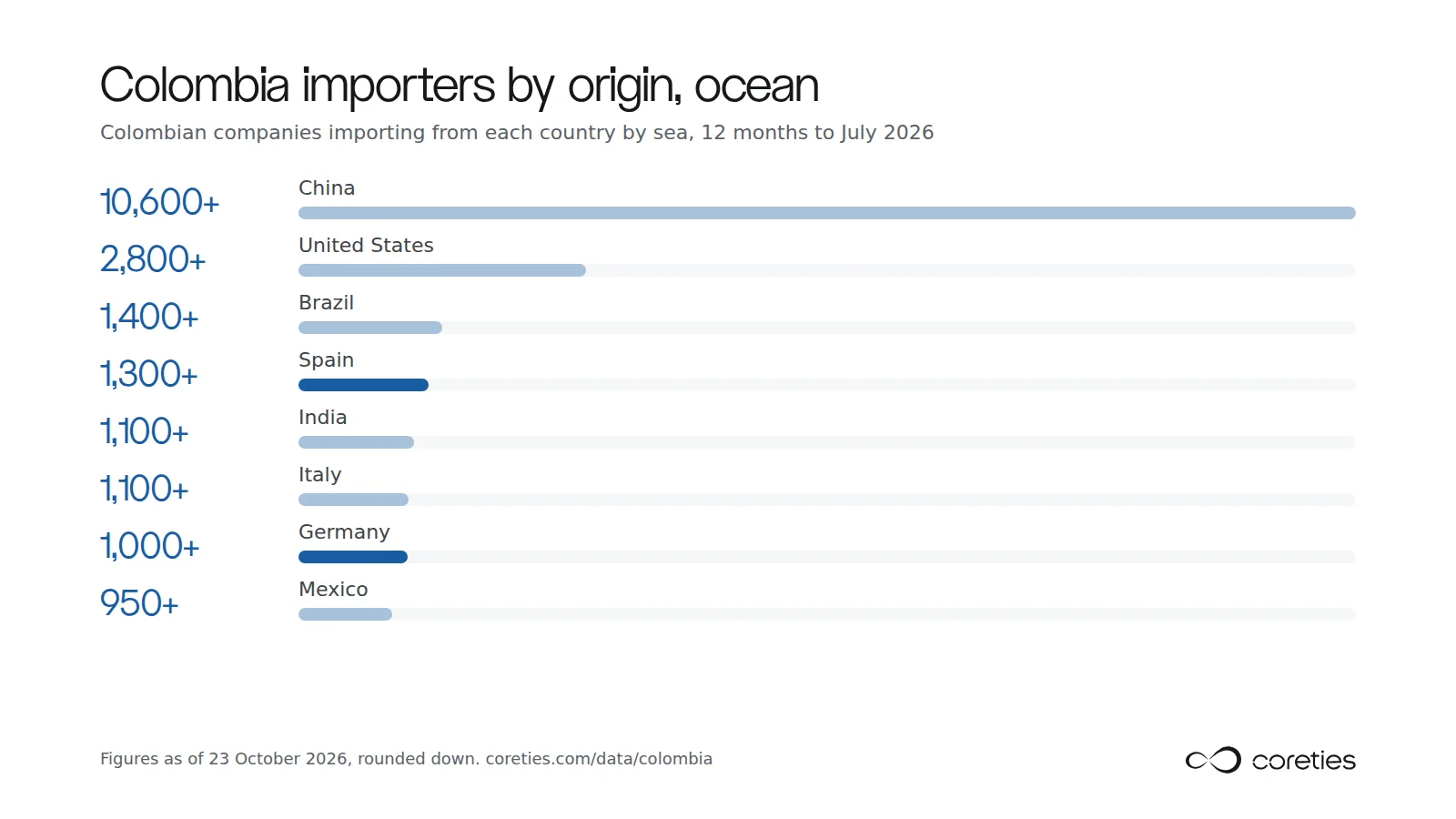
Say you’re a forwarder in Spain or Germany with a strong ocean product to Cartagena and Buenaventura. Who should you call? Coreties’ Colombia data page answers the first part. In the 12 months to July 2026, more than 19,000 Colombian companies imported by ocean or air. By sea, 1,300+ imported from Spain and 1,000+ from Germany. China is far ahead at 10,600+ importers, so a European forwarder is working a smaller, more specific pool, which is exactly where a targeted list helps.
Plastics and polymers (3,900+ importers) and machinery (3,600+) are the biggest cargo groups. In Coreties shipper search, a Spanish forwarder would filter Spain to Colombia, pick the cargo it handles well, and sort by who is new on the lane or growing. Supply Chain Analysis then gives sourced reasons to reach out to a specific company, contact discovery finds the logistics decision-maker, and outreach drafts a message that waits for the rep’s approval and sends from their own mailbox. The full flow is on how it works; for the method behind it, see how to find shippers and sales in logistics.
How to evaluate forwarding software
Don’t watch a demo, admire the dashboard and let procurement compare price lines. Test whether the system handles your actual operation, your exceptions and where you plan to grow.
Questions to put to every vendor:
- What can we connect to accounting, carriers, customer portals and email without custom development?
- What happens when two systems disagree about a record, and who owns failed transactions?
- Can it run several branches, countries, currencies and legal entities without heavy customization?
- How are rates versioned, approved and audited?
- How long did implementation take for a customer our size, and can we call that customer?
Run scenario demos with your own files
Give each vendor the same scripted scenarios from your operation and watch them run end to end:
- An urgent import with incomplete documents and a customs handoff.
- A quote with several surcharges and two routing options.
- A billing dispute where operations, sales and finance need the same history.
- A customer shipping through three of your offices who wants one view.
A quote created in one place should flow into the booking, status updates and the invoice without anyone typing it again. If the vendor needs slides to show that, you have your answer.
Separate must-haves from nice-to-haves
Projects bloat when leadership tries to solve every future need in one purchase. Sort requirements into three lists:
| Priority | What belongs here | How to buy |
|---|---|---|
| Must have | Workflows the business can’t run without | Test each one in the scenario demo |
| Should have | Capabilities that improve control or scale | Negotiate roadmap and configuration effort |
| Nice to have | Extras that won’t decide success | Don’t let them sway the choice |
Making the systems work together
Good individual tools still add up to a bad system if they don’t share data. The usual result is one customer list in the CRM, another in the operations system and rates in shared folders.
Decide where each master record lives:
- Customer master: CRM or ERP.
- Shipment master: the operations system.
- Financial master: ERP or accounting.
- Document master: the document or operations system.
Which one you pick matters less than everyone knowing it. If nobody knows which record wins, errors become structural.
APIs and EDI in plain language
An API lets two applications exchange data on request, close to real time. EDI exchanges standard message formats and is still common with carriers and large shippers. Most forwarders need both. The goal is moving the right data once, to the right system, without anyone keying it again.
Follow the thread from lead to cash
A lead becomes an account, a quote, a shipment, then an invoice. When those stages live in separate tools, sales doesn’t see service problems and operations doesn’t see what was promised. Shipping data used for prospecting is worth more when it carries through into the account record too. Port import and export reports covers how that data is built.
Integration needs an owner for field mapping, naming and sync rules. If a vendor says integration is easy, ask what happens when customer names don’t match or branch codes differ.
Implementation and change management
A good choice can still fail in rollout, because it’s a change to how the company works, not a technical install.
- Build a cross-functional team. An executive sponsor who forces decisions, a project owner, experts from pricing, operations, customs, finance and sales, a data lead for migration, and a champion in each branch.
- Roll out in phases. Start with one branch, mode or workflow such as quoting plus booking. Run live transactions, log friction immediately, and fix what matters before you widen scope.
- Clean data before migration. Remove duplicate customers, retire obsolete rates, fix user permissions and write down the workflow exceptions that live in one person’s head. Otherwise you import old confusion into a nicer screen and blame the system.
- Manage resistance directly. Tell each team what gets easier for them, train by role, and keep support running after go-live.
Measuring the return
Don’t judge the project by whether it launched on time. Judge it by whether the business runs better six months later. Track:
- Quote turnaround time.
- Places where staff still retype data.
- How early shipment exceptions are caught and closed.
- Invoice disputes and days to invoice after a shipment.
- Margin visibility per shipment, lane and customer.
- New shippers contacted and won per salesperson.
Then retire the shadow spreadsheets so old habits don’t creep back.
Frequently asked questions
What is the best freight forwarding software?
There isn’t one best. Large multi-country forwarders tend to shortlist enterprise platforms such as CargoWise; small and mid-size forwarders often compare cloud platforms such as Magaya, GoFreight, Descartes, Logitude and Logistaas. Pick the one that runs your own scenario demos cleanly.
What software are forwarders using to replace spreadsheets?
Usually a cloud operations platform with built-in rate management and accounting first, then a customer portal, email tools that link messages to shipments, and a sales tool for finding shippers on their lanes.
How long does implementation take?
It depends on scope, data quality and how many departments are involved. A single-branch rollout can take weeks; a multi-branch project with finance, customs and CRM takes longer, because process decisions and data cleanup drive the timeline more than installation.
Should a small forwarder buy an all-in-one system?
Often, but not automatically. Fewer moving parts help a small team. The test is whether it fits your real workflow without forcing complexity you don’t need yet.
Is there a database of shippers for freight forwarders?
Yes. Shipper discovery tools such as Coreties list the importers and exporters on a lane, what changed in their shipping, and who to contact. See lead generation software for freight forwarders and how the tools compare.
Want to see who ships on your lanes? Get a free market study or book a demo.